HOW TO CREATE OPENBOOK MARKET ID
Proceed to create a Raydium OpenBook Market ID for your token on https://pumpbundler.com/#/raydium/createId This will enable users to trade your token on Raydium and OpenBook Orderbook Exchange.
Start by selecting your Base token address, which is your token address. Leave Quote Token at default, which is the SOL address.
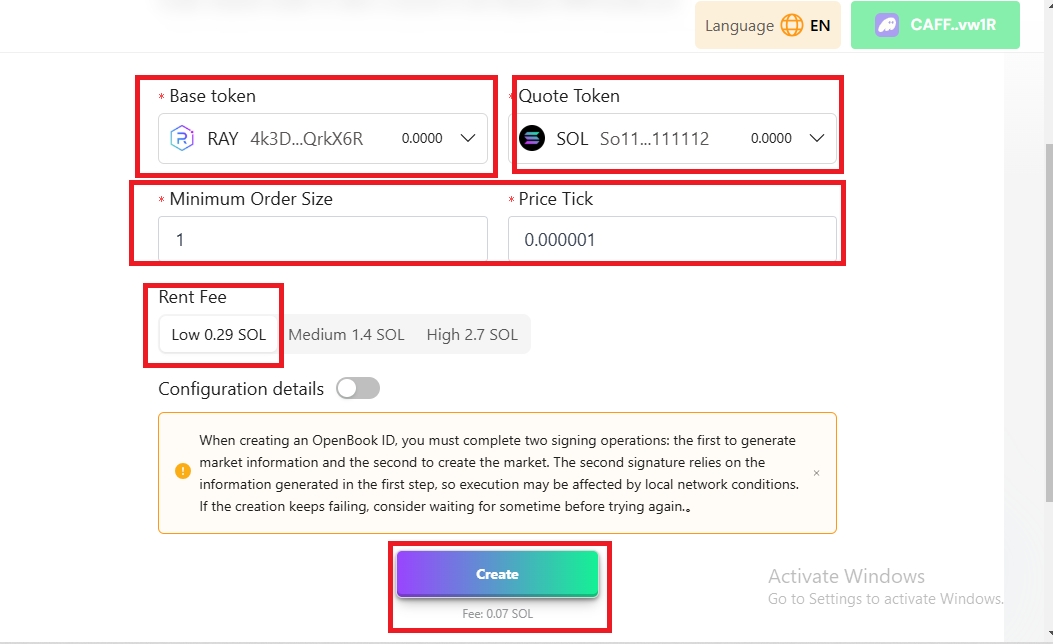
There's a default settings for the Min. Order Size and Price Tick for your Token. We recommend that you don’t change the inputs in other not to encounter any error during the Market creation process.
Leave Rent Fee at Low 0.29 SOL
Note: Never change the inputs suggested by the tool unless you know what you’re doing.
Next is to create the Market ID, which cost will cost 0.29 SOL + 0.07 SOL=0.36 SOL.
Now you can create the market id by clicking on Create.
Copy the Market ID and head over to Create Pool to create a liquidity Pool on Raydium.